Posted: 28/01/2025
How to Find Facebook Page ID: 3 Methods
Last updated:
With 10 million active advertisers on Meta platforms (Uproas, 2026), finding the right Facebook Page ID is the essential first step for competitor research. Whether you're using Meta Ad Library, setting up automated tracking, or integrating with marketing tools, you need that numeric identifier.
This guide shows you 3 ways to find any Facebook Page ID in under 2 minutes—no technical skills required.
TL;DR: Go to any Facebook page → click About → scroll to Page Transparency → copy the numeric Page ID. This works for any public page. Use this ID for Meta Ad Library searches (
view_all_page_id=YOUR_ID) and competitor tracking tools.
What Is a Facebook Page ID and Why Does It Matter?
A Facebook Page ID is a unique numeric identifier (like 215165411934543) assigned to every Facebook business page. Unlike usernames that can change, Page IDs are permanent.
Why Page IDs matter for marketers:
- Meta Ad Library access: Search competitor ads directly with
view_all_page_idparameter - Competitor tracking: Tools use Page IDs to identify and monitor specific advertisers
- API integrations: Facebook Marketing API requires Page IDs
- Long-term reliability: Even if a competitor rebrands, their Page ID stays the same
With Facebook generating $156.8 billion in projected 2025 ad revenue (Uproas, 2026), understanding how to track competitor advertising on this platform provides significant competitive advantage.
Method 1: Find Page ID from the About Section (Works for Any Page)
This is the fastest, most reliable method. It works for competitor pages, partner pages, or your own pages.
Step-by-Step Instructions
Step 1: Navigate to the Facebook Page
Open your web browser and go directly to the Facebook page you need the ID for. This works for any public business page.
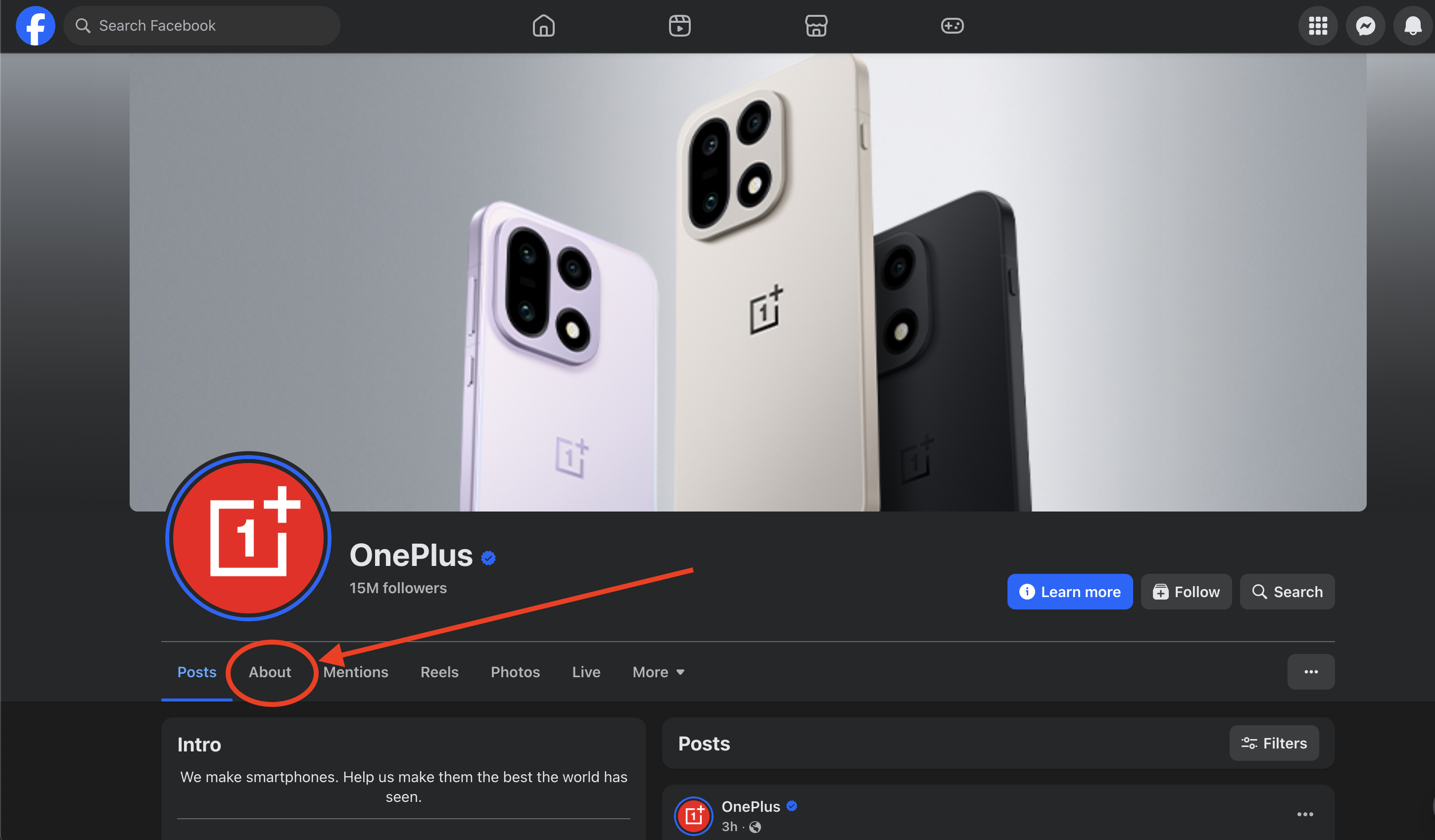
Step 2: Click on the About Tab
Find the "About" tab:
- Usually located under the cover photo
- May appear in the left sidebar
- Click "More" if it's not immediately visible
Step 3: Scroll to Page Transparency
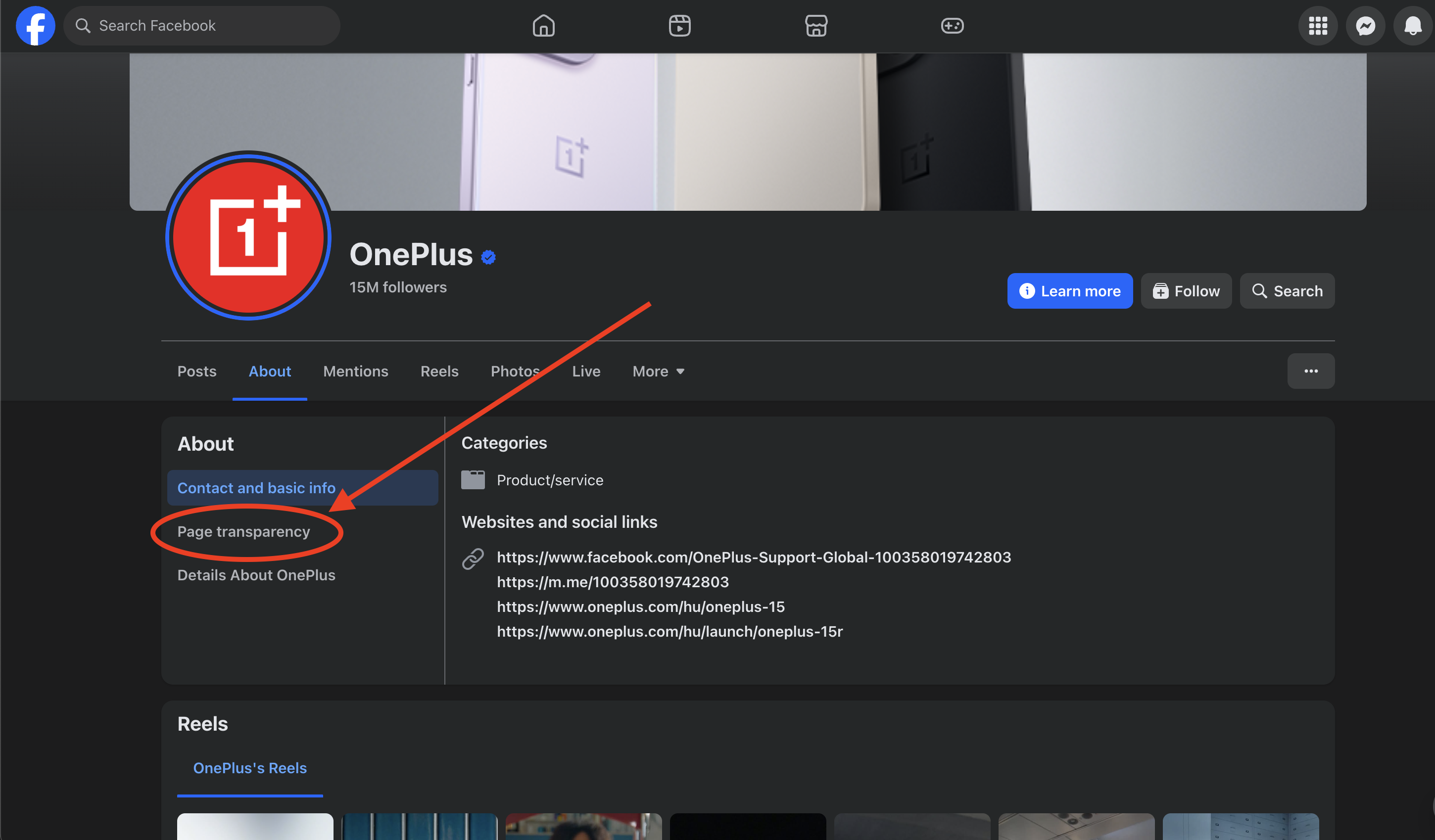
On the About page, scroll down to find the Page Transparency section. Facebook displays all technical information about the page here, including the Page ID.
Step 4: Copy the Page ID
You'll see the Page ID displayed as a numeric string. Copy this number.
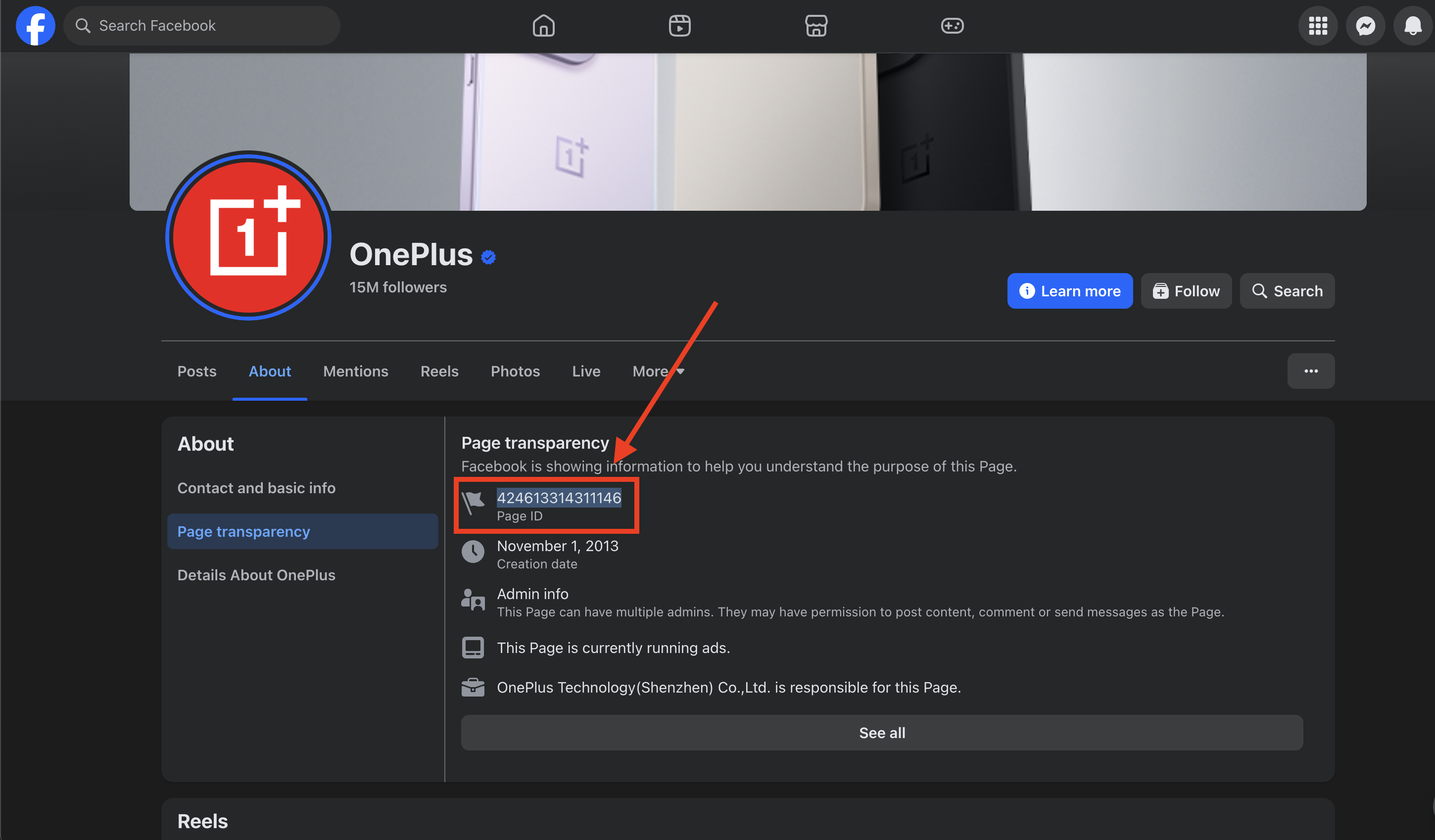
That's it. You now have the Page ID for use with Meta Ad Library or competitor tracking tools.
Method 2: Find Page ID Using Meta Business Suite (For Pages You Manage)
If you have admin access to a page, Meta Business Suite provides additional details alongside the Page ID.
Step-by-Step Instructions
Step 1: Go to business.facebook.com and log in
Step 2: Click Business Assets or Settings in the left navigation
Step 3: Select Pages to view all pages you have access to
Step 4: Click on the specific page—the Page ID appears in the page details
This method also shows when the page was created, its category, and linked assets.
Method 3: Find Page ID from the URL (Sometimes Works)
Some Facebook page URLs reveal the Page ID directly. This method is quick but doesn't work for all pages.
URL Patterns That Show Page IDs
| URL Format | Where to Find the ID |
|---|---|
facebook.com/pagename-1234567890 | Numbers after the hyphen |
facebook.com/profile.php?id=1234567890 | Number after id= |
facebook.com/pages/Name/1234567890 | Final number sequence |
facebook.com/pagename | Not visible—use Method 1 |
When This Works vs. Doesn't Work
Works for: Pages with numeric URLs, legacy URL formats, pages without vanity URLs
Doesn't work for: Most modern business pages use vanity URLs (facebook.com/nike) that hide the numeric ID. For these, always use Method 1.
How to Use Facebook Page ID for Competitor Research
Once you have a competitor's Page ID, here's how to use it:
Direct Meta Ad Library Search
Construct a URL with the Page ID to view all ads from that advertiser:
https://www.facebook.com/ads/library/?active_status=active&ad_type=all&country=ALL&view_all_page_id=PAGE_ID_HEREReplace PAGE_ID_HERE with the numeric ID you found. This shows all active ads from that page.
Automated Competitor Tracking
With tools that monitor Meta ads, enter either:
- The Facebook Page URL, or
- The Page ID directly
The tool will use the Page ID to continuously monitor that advertiser's campaigns and alert you when they launch new ads.
For a comparison of manual vs automated tracking, automation saves 85-95% of research time according to Arise GTM (2026).
Page ID vs Username: Key Differences
Understanding the difference prevents common mistakes.
| Characteristic | Page ID | Username (Vanity URL) |
|---|---|---|
| Format | Numeric only (215165411934543) | Text-based (nike) |
| Changes? | Never | Can be modified by admin |
| API usage | Required for most calls | Display purposes only |
| Reliability | Always accurate | May change if page rebrands |
| Ad Library URL | Uses view_all_page_id parameter | Uses search function |
Key takeaway: Always use Page ID for technical integrations, API calls, and long-term competitor tracking. Usernames are convenient for humans but unreliable for systems.
Common Page ID Questions
Can I find the Page ID for any Facebook page?
Yes. Page IDs are public information for all public business pages. Visit the page, go to About, scroll to Page Transparency, and the ID is displayed. Private pages or restricted pages may not show this information.
Do Instagram business accounts have Page IDs?
Instagram business accounts are linked to Facebook Pages. When you track Instagram ads, you use the connected Facebook Page ID. Both Facebook and Instagram ads from a business appear under the same Page ID in Meta Ad Library.
Does the Page ID ever change?
Never. Once assigned, a Facebook Page ID is permanent—even if the page changes its name, username, category, or admin. This permanence makes Page IDs the most reliable identifier for tracking.
What if the About section doesn't show the Page ID?
Some pages have minimal About information. Try:
- Look specifically for "Page Transparency" link in the sidebar
- If you have admin access, use Meta Business Suite (Method 2)
- Check if the page is public—private pages may hide this information
Can I look up multiple Page IDs at once?
No bulk lookup exists in Facebook's interface. For multiple competitors, find each Page ID individually using Method 1. Once you have the IDs, you can add them all to tracking tools or create bookmarked Ad Library URLs for quick access.
Frequently Asked Questions
What is a Facebook Page ID?
A Facebook Page ID is a unique numeric identifier (like 215165411934543) assigned to every Facebook business page. Unlike usernames that can change, Page IDs are permanent. With 10 million active advertisers on Meta platforms (Uproas, 2026), Page IDs are essential for tracking competitor ads.
How do I find my Facebook Page ID?
The easiest method: visit your Facebook page, click the About tab, and scroll to Page Transparency. The Page ID is displayed there. You can also find it in Meta Business Suite under Business Assets > Pages.
Can I find the Page ID of any Facebook page?
Yes, Facebook Page IDs are publicly available for all public pages. Visit any public business page, go to About > Page Transparency, and you'll find the numeric ID.
What's the difference between Facebook Page ID and username?
Page ID is a permanent numeric identifier that never changes. Username (vanity URL) is a customizable text string that page admins can modify. Always use Page ID for API integrations and competitor tracking because it's immutable.
Why do I need Facebook Page ID for competitor tracking?
Meta Ad Library and competitor tracking tools use Page IDs to identify specific advertisers. The Page ID ensures you're tracking the correct competitor even if they rebrand or change their username.
Does the Facebook Page ID ever change?
No. Once assigned, a Facebook Page ID never changes—even if the page name, username, category, or admin changes. This makes Page IDs the most reliable identifier for long-term tracking.
Related Guides
Meta Ads Research:
- Meta Ad Library Report Guide
- How to use the free library
- Monitor Meta, Facebook & Instagram Ads
- Platform guide
- Meta Ads Monitoring: Competitive Insights
- Strategy deep-dive
Competitor Tracking:
- Competitor Ads Tracking: Complete Guide
- Foundation article
- How to Track Competitor Ads Step-by-Step
- 8-step framework
- Automated vs Manual Monitoring
- Efficiency comparison
Tools & Strategy:
- Best Ad Spy Tools 2026
- Compare options
- Google Ads Competitor Analysis
- Cross-platform research
- What to Look for in an Ad Tracking Tool
- Feature guide